Control what each tier unlocks
A membership can hold several tiers, and each product you sell can behave differently for each one. This is the access matrix: for any course, download, or product, you decide whether a tier gets full access, a locked preview, or cannot see it at all. Content access is controlled entirely by tier.
Open your membership and find "Members get access to"
Edit your membership and scroll to Members get access to. Click Add product to include any product you have created. Each one becomes a row with a badge for every tier.
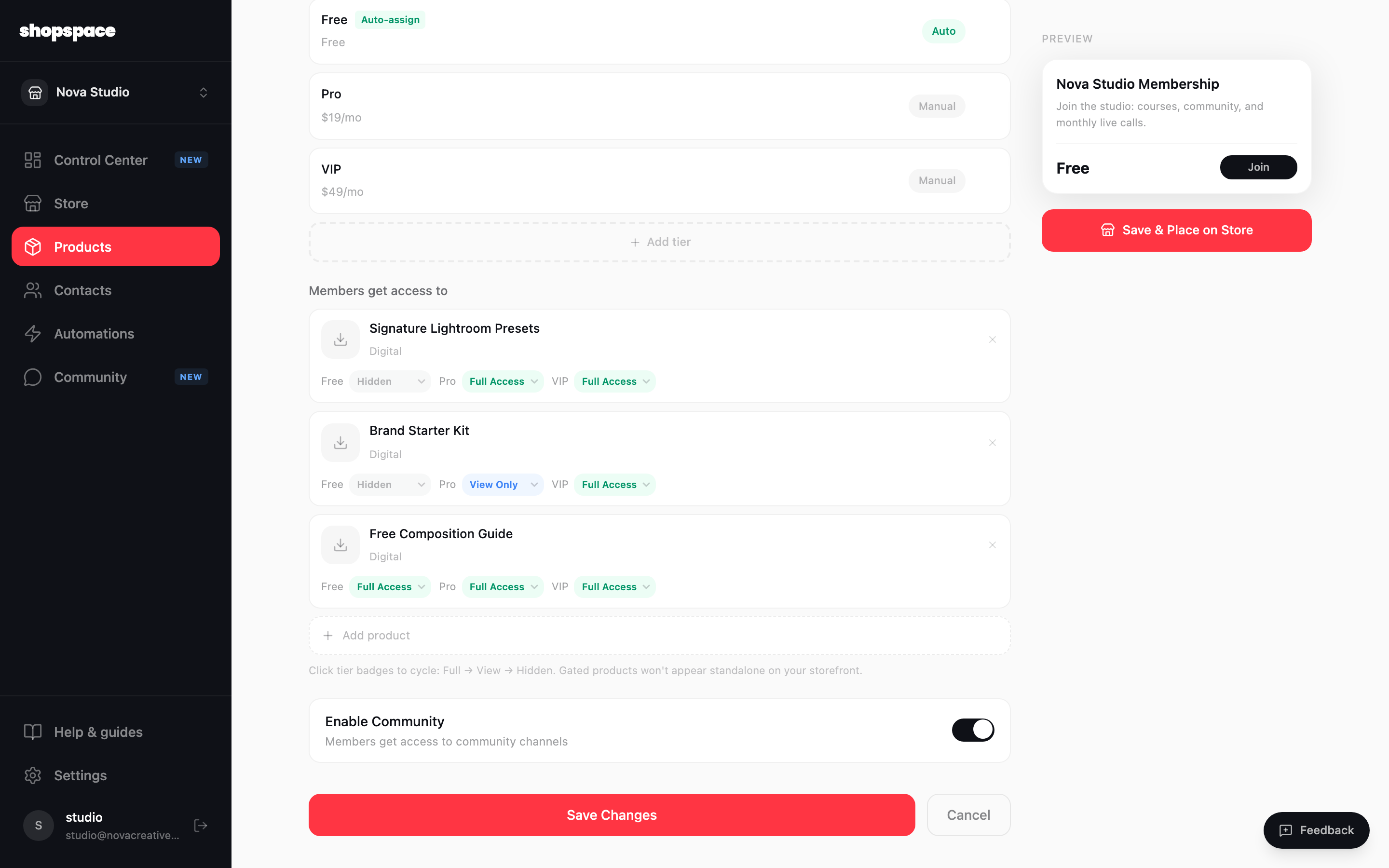
Set the level for each tier
Click a tier badge to cycle through three levels. Full Access lets the member open and use the product. View Only shows it but keeps it locked, a teaser that nudges an upgrade. Hidden means that tier does not see it at all. In this example the free tier cannot see the preset pack, Pro can preview the Brand Starter Kit, and VIP gets everything.
Keep community access separate
The Enable community toggle simply opens the door to your channels. What each member can do once inside is decided by roles, not by this matrix. That is the next guide.
Good to know
- View Only is a quiet sales tool: let a lower tier see what it is missing so it has a reason to upgrade.
- A product added here and set to Hidden for every tier disappears from your public storefront and becomes members-only.